Adjusted For Inflation
In 1993, in the Preface for Excel 5 Power Programming With VBA, I asked for reader feedback, and wrote:
Of course I would prefer to receive comments like, "This is the best book I've ever read" or "Thanks to this book, I was promoted and now make $150,000 per year."
In the second edition of that book, I raised the salary to $175,000. In the Excel 2000 edition, the salary expectation (inexplicably) went down to $85,000. In the Excel 2002 edition, it went up to $90,000. It increased again in the Excel 2003 edition, up to $105,000. In the Excel 2007 edition, the salary expectation rose to $112,000. In the Excel 2010 edition, it will be $124,000.
Here's how it looks graphically:
I wish I could remember why I reduced it for the Excel 2000 edition. Maybe someone told me that the salary was unrealistic.
The Book Winners
Today's 2-hour PUP sale was a major success. I was really surprised by the turnout. There are now 135 new PUP users. That works out to more than one per minute of the sale. Frankly, I was expecting about 50, tops.
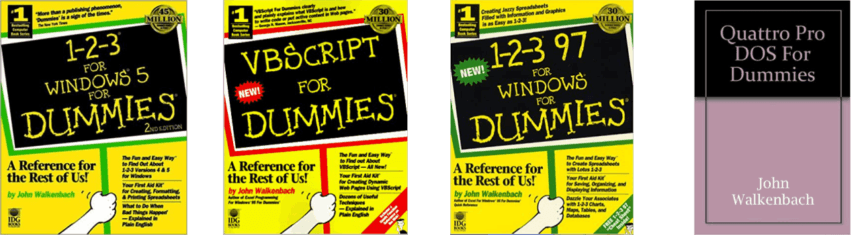
The "but wait, there's more!" part of the sale was a free book for three randomly chosen customers. I asked the winners to provide a prioritized list of the books they want, because I only have one copy of some of them. They were all able to get their first choice:
Excel 2007 Books For Sale
I need to start making room for the Excel 2010 books. I have two copies of the "Walkenbox" for sale (officially known as Mr. Spreadsheet's Excel 2007 Library).
It's a boxed set that includes four Excel 2007 books -- plus a free licensed copy of PUP v7 (a $40 value). The price is $75, and I'll pay the shipping in the continental U.S. If you buy this at Amazon, it's $107 + shipping.
If you're interested, let me know and I'll tell you how to pay with a credit card or PayPal.
Update: Both have been sold.
That Chart Looks Familiar
A woman in Australia named christielee1 posts Excel tutorial videos at YouTube. For example:
The only problem is that many of these tutorials come directly from my books. She uses the sample files on the CD, makes a few minor changes, and claims that she created them. I guess I should be flattered that she thinks so highly of my work that she claims it as her own.
She also has a blog, which also has several of my example. Again, with no acknowledgment of the original source.
Back To Work
Well folks, after a 2-year hiatus, I'm back to writing books.
Today was my first day working on the book revisions for Excel 2010. It took me a while to get into the swing of things, but it was actually kind of fun. Even though there aren't a lot of new features in Excel 2010, I'm doing my best to beef up the old books with new material.
I immediately discovered that the template provided by my publisher (Wiley) just doesn't work in Word 2007 or Word 2010. The template has lots of styles, with VBA macros that make it easy to apply those styles. It's all done in a very interactive toolbar which spawns other toolbars. And as we all know, support for those old toolbars pretty much sucks in Office 2007 (and 2010). So my first task was to install Word 2003. And that's what I'll be using to revise these books.
This is probably a very typical problem. Great new software arrives, but solutions that you've used for years stop working so you can't even use that great new software.
I must say that I like Word 2003 much better than the later versions -- especially the ability to load multiple documents in one window. When working with multiple documents, I really don't like having all of those separate windows cluttering my screen.
More Translated Books
I found out that three more of my books are now available in translated versions: Two in Chinese, and one in Serbian.
That makes 19 translations of Excel 2007 books.
New Advertising Campaign?
Someone posted this in a comment at my other blog. So good, I had to share it.
For those who don't get it, the guy is a minor TV commercial celebrity in the U.S. He sells a product that, apparently, can be purchased for much less at an auto supply store.
Bad Book Reviews
I've been looking at Amazon's reader reviews of my books to get ideas on how I can improve the next editions. Amazon doesn't allow a user to indicate no stars, so I look at the"1-star" reviews -- which means the reader didn't like the book at all.
Here are the current 1-star reviews for my Excel 2007 books:
tooo much literal explanation, hard to guess.
this is not good book. too much literal explanation, and the most importnat is there has no any screen with highlighted instruction , so user can quick understand where and how to do it. With too many small words to explain the operation, it's hard for user to understand and it takes user too much time to search around the location of what the author trying to point out from the screen. I was trying to learn more skills of Excel, but after reading couple of chapters from this book, now my enthusiasm is gone!
What I learned: I explain things too literally, and I use too many small words.
Excel 2007
The disc in the back of the book was sliced off (I guess by the printer.) I need the disc replaced.
What I learned: I need to check each book before it ships.
Excel 2007 Power Programming With VBA
Printing is horrible
I purchased two books Excel 2007 and Excel 2007 VBA Power Programming by John Walkenbach, one of the best text book writers I have come across in my 74 years. The books were horrible. It wasn't John's fault. It was the publishers fault... The 2007 version is almost impossible to read the print density is so light. This other publishing company may have saved money on using less ink but they now have one very unhappy customer. John I think you goofed by going to another publishing company.
I agree with this one. Maybe they're trying to save money by using gray ink? Unfortunately, that sort of thing is entirely beyond the control of the author.
Missing Book on CD !! A critical issue (WATCH OUT)
DON'T BUY THIS BOOK UNLESS IT GETS UPGRADED WITH THE RIGHT CD! (Here the challenge would be to know when this is done). It's a shame that this happens with a book that we had been waiting for so long, specially for most of us who regularly travel and it is not practical to carry such a heavy package everywhere.I'm also quite disappointed with the results obtained after contacting the author (who said the he didn't have the pdf file himself! Do you believe this?). Is that the type of customer support that we expect as end users? Additionally, I tried the link to get support from Wiley, but guess what: the web page is not working!! (so don't be so confident that this can be resolved quickly).
Unfortunately, the CD included with the first printing of this book was missing the PDF file. The publisher (not the author) is responsible for problems like this, and I've steered at least 100 people to Wiley's support page -- and I've heard only two complaints. Wiley's site had a temporary glitch that was fixed within 24 hours. Many of these people got back to me expressing their amazement at the great support from Wiley.
Not for newbies
Althought the author is pretty well versed in the use of Excel, it is not much help to those just starting to use the progeam. Written pretty much the same way most Microsoft "help" books are written. It assumes you have quite a bit experience with macros and other such "helpers".
What I learned: I should make sure that every reader sees the text on page xxv: "This is not a book for beginning Excel users. If you have absolutely no experience with Excel, this is probably not the best book for you."
Kindle Book Pricing And Document Titles
Amazon's Kindle 2 has been announced, and I ordered one. It's missing a few features that I would have liked, but I don't want to have to wait another year for the next version.
Several of my Excel books are available in Kindle editions. The price differential is much less than I would have thought. For example:
- Excel 2007 Bible (paperback): $26.39
- Excel 2007 Bible (Kindle): $23.75
So you save only $2.64 by getting the electronic version. You'll also save on shipping, since Kindle books are delivered electronically, free.
But guess what else...
CD-ROM/DVD and other supplementary materials are not included as part of eBook file.
The CD that comes with the paperback book includes a PDF version of the book. Unfortunately, Kindle does not support PDF files directly. The PDF file can be converted, but I suspect that the conversion is less than optimal.
Something else caught my attention at Amazon's site:
Notice the HTML SUP (superscript) markup tag? There are at least 100 other Kindle books that have these tags in their title.
A friend sent me a photo of his Kindle displaying the sample version of my book:
Yep, the erroneous markup tags appear in the header of every page! And the "registered" symbol isn't even rendered. I hope that's only in the sample file, not the actual file.
I wonder if anyone even looks at these documents after they are Kindlized?
Excel Books For Kindle
Amazon's Kindle ebook reader is being updated. Amazon's Kindle 2 Will Debut Feb. 9.
Amazon.com will introduce the next generation of its popular Kindle reader in New York City on Feb. 9.
The company sent out e-mail messages Tuesday announcing a news conference on that date at the Morgan Library & Museum in New York. Amazon.com confirmed that its founder and chief executive, Jeffrey P. Bezos, would host the event.
Amazon would not comment in any more detail about the coming announcement, but the Kindle's detail page on Amazon.com tells the story. It now says the electronic book reader will ship in four to six weeks. It previously suggested a wait of 11 to 13 weeks.
What does that mean for Excel mavens?
Well, currently there are 87
Excel books available in Kindle format.
And I wrote eight of them. As I write this, the Excel 2007 Bible
is the #1 selling Excel Kindle book, and ranks #729 among all 230,000 Kindle
books.
Poor Guy
Debra, at Contextures Blog, periodically searches Twitter for entries about Excel. She found one that mentions one of my books.
Old man on the subway is reading Excel 2000 Power Programming with VBA. Poor guy.
Indeed. He really should upgrade to a later version of Excel.
Excel 2007 Book Excerpts Are Available
I just found out that Wiley has made available quite a few excerpts from some of my Excel 2007 Books.
These excerpts are all at Microsoft's site. They are in *.MHT format, so you'll need Internet Explorer to read them. Or, you can download the files and open them with Microsoft Word.
Excerpts
from
Excel 2007 Charts:
- A chart maker's check list
- Adding lines and backgrounds to a chart
- Chart accuracy
- Charting a noncontiguous range
- Creating a box plot
- Creating a comparative histogram
- Creating a multiline category axis
- Creating a thermometer chart
- Creating a timeline
- Displaying multiple charts on a chart sheet
- Don't be tempted by 3-D charts
- Introducing Excel charts
- Problems with pie charts
- Understanding series names
- Using time-scale axes
Excerpts
from
John Walkenbach's Favorite Excel 2007 Tips & Tricks:
- Annotating a chart
- Creating worksheet-level names
- Dealing with missing data in a line chart
- Knowing when to use absolute references
- Knowing when to use mixed references
- Making a worksheet "very hidden"
- Returning the last nonblank cell in a column or row
- Summing across sheets
- Understanding workbooks versus windows
- Updating old fonts
- Using AutoSum tricks
- Using the status bar selection statistics feature
- Various methods for rounding numbers
Excerpts
from
Excel 2007 Bible:
- Applying number formatting
- Creating your first worksheet
- Getting to know the formatting tools
- How Excel handles dates and times
- Understanding array formulas
- Understanding custom Excel templates
- Understanding formula basics
- Understanding workbooks and worksheets
- Using different fonts
Excerpts
from
Excel 2007 Formulas:
My First Kindle Book
My Excel VBA Programming For Dummies is now available in a Kindle Edition.
The price is $9.99, compared to $16.49 for the paperback edition.
Kindle is Amazon's wireless reading device, which also provides free Internet access. I'm very tempted to buy one.
Two New Translations
I recently received copies of two of my book translations. I hardly ever never know when a book is being translated. On rare occasions, a translator will contact me with questions. But mostly, the translated books are surpises.
- Excel 2007 PL Formuly - Translated into Polish by Lukasz Piwko and Wojciech Demsk
- Excel 2007 Grande Guida Per Il Professionista - Translated into Italian by Anna Rizzon, Carolina Figini, and Pier Franco Chillin
I'm almost always impressed with the translated books, even though I can't read them. An amazing amount of work is involved translating all files and re-doing the screen shots.
Sometimes I wonder who these translators are. Just for fun, I Googled the three people who translated the Excel 2007 Bible into Italian.
- Anna Rizzon has written at least one book. She's also made a few contributions to Wikiwords and (if this site is accurate) she earns 7.4 cents per word.
- Here's the resume of Carolina Figini (Word file), and her listing at Translators Cafe. Plus, an online petition that she signed.
- Pier Franco Chillin wrote an least one book, HTML in Your Pocket.
[Next page]
Spreadsheet Page Blog
Welcome to the Spreadsheet Page Blog. This is where you find the latest news on my books, add-ins, and other Excel-related topics. Comments are welcome.


Amazon.com
will introduce the next generation of its popular Kindle reader in New York
City on Feb. 9.