Arranging Your Data
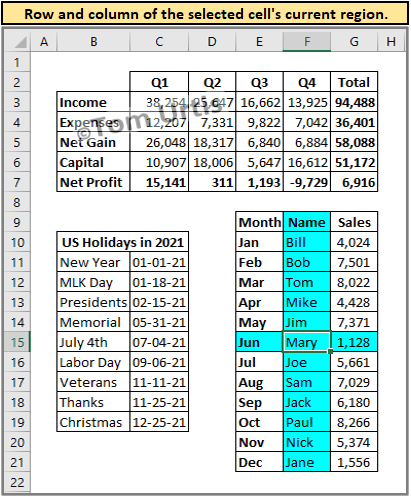
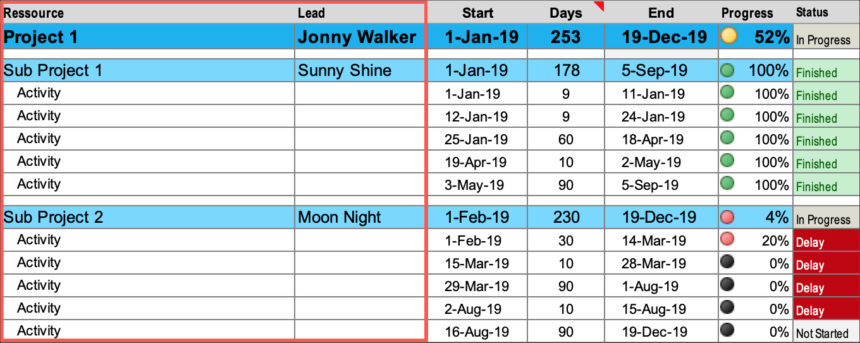
Last week, someone sent me a workbook because he was having some problems with it. Here's a small section from the file:
It was arranged in categories, and each category had tasks below it, arrange in a row. Under each task name was date to indicate when the task was performed. Many of the date cells contained a cell comment to clarify (3,810 comments in all). Summary formulas were entered to count the dates. And each formula was hand-crafted because the layout was so haphazard.
I was very surprised to see such a poorly organized worksheet. But, after giving it some thought, this sort of thing is probably not at all unusual. The typical user, I think, probably starts entering data without giving the organization much thought. At first, it's easy makes sense. But after a few years of data entry, you end up with a complete mess.
I suggested that this person spend a day or two and copy/paste the data into a normalized table with four column headers: Category, Task, Date, and Comments. Data entry would be much easier, and the information in this table can be easily sorted, filtered, or summarized with a pivot table.
To a typical user, it probably seems very inefficient to repeat the category name and task name for every entry in the table. But it's actually the most efficient way to store data.
New Shortcut Key Discovered
Pointy Haired Dilbert compiled a comprehensive list of Excel keyboard shortcuts.
And that reminded me of a new shortcut I discovered last week:
- Ctrl+D makes a copy of an embedded chart (Excel 2007 and Excel 2010 only).
To help you remember, think "D for Duplicate." I couldn't find it in the Help system, and a cursory check of the Web leads me to suspect that I'm the first person in the world to discover this.
Before Excel 2007, the easiest way to copy a chart is to press Ctrl while you drag the chart with your mouse. That action was removed in Excel 2007, but Microsoft provided an even easier method -- and didn't even tell anyone about it!
Greg Likes The Book
Yet another unsolicited bit of fan mail:
Just a quick note to tell you how impressed I have been, for a very long time, with your Excel books. I bought one several years ago (maybe Excel Power Programming With VBA?) and, at the time, it put me ahead of all of my colleagues in terms of practical, ready to use knowledge about MS Excel.
Skip forward at least a decade and I had a current need to update my ss skills and went to Barnes & Noble to get some up-to-date resource technical materials. As I was scanning the available materials, my wife said "how can you ever manage to figure out which Excel book to pick?" At that moment in my scanning, I saw just "Walkenbach" and I pulled it out and replied "Right here, this guy is an Excel genius. I recall reading one of his earlier Excel books and it was just incredible." I think she thought I was kidding.
Well, I took Excel 2007 Bible home over the weekend and cracked it open this morning to get up to speed on charts. I wrapped up the 'Getting Started Making Charts' intro on charts and am just part way into 'Learning Advanced Charting' and I am very impressed! Your exceptionally clear writing style, focus on how to do the task at hand, easy transition from introductory to advanced materials are all just top-of-the-line.
So, I thank you, man, for putting out such a truly great product and I wish you the very best. I can't say enough good stuff!
Wishing you the best,
Greg S., NY
I'm glad you like it, Greg.
Excel 2010 VBA Enhancements
At the official blog of the Microsoft Excel product team: Migrating Excel 4 Macros to VBA.
Excel has a macro facility, known as Excel 4 macros (XLM for short) that was the primary macro language prior to the introduction of VBA in Excel 5.0. Most people have long since migrated their Excel 4 macros to VBA; however, some Excel 4 macro capabilities were missing from VBA, which made this migration difficult.
In Excel 2010, one of our goals was to remove any remaining barriers that people had to complete the migration of Excel 4 macros to VBA.
The article lists quite a few things that, in the past, required an XLM macro. The most important new feature is the ability to provide argument descriptions for user-defined functions. These are the descriptions that appear in the Function Arguments dialog box.
I posted a new tip that demonstrates how to do this: User-Defined Function Argument Descriptions In Excel 2010.
14 Years Old
Today is the 14th anniversary of The Spreadsheet Page. How quickly they grow up!
Here's how it looked in 1997:
Click to enlarge, or try navigating it at archive.org.
I'd say my site design skills have improved over the years.
Joe’s A Fan
Here's another unsolicited fan mail:
Mr. Walkenbach,
My name is Joe P. I'm a 22 year old college senior. I've been working on a co-op for about a year with a local company in Quality Assurance. When I started, the demands of the job went beyond my capabilities: they needed someone who could write Excel macros, and a lot of them. Determined to fulfill the role, I went to Barnes and Noble and picked up "Excel VBA Programming for Dummies."
That was about 9 months ago. Since then, I've learned the amazing things Excel can do thanks to your easy to follow guide. Not only has it expanded my capacity at work, but I've taken my Excel VBA skills and like to make fun spreadsheets in my spare time. I spent about 4 or 5 months writing a program that plays and analyzes the game of Craps in a little over 1 MB.
My time on co-op is almost up. When I leave, I plan to start up a consulting firm. I'm going to contract my services at building spreadsheets to small businesses in the area. Excel programming has become one of my favorite things to do, and I'm hoping I can find a market for my skills... I can't imagine a better way to make a living.
So I just wanted to send you a sincere thank you for writing your book, and wanted to let you know, I've put the information to great use, both professionally and personally.
Thanks for the kind words, Joe. When I started reading your email, I just assumed that the book you used was Excel Power Programming. Glad to hear that the For Dummies book also works.
Chess Game Viewer
This is one of the most creative Excel apps I've ever seen. Created by Daniel Ferry, At Excel Hero: Excel 2007 Chess Game Viewer.
It uses no macros. Unprotect the worksheet and try to figure out how it work. Some hints:
- Dynamic Charting with No VBA
- Combination of XY (Scatter) and Stacked Column chart types
- Marker Fill with picture files.
- Conditional Chart Formatting for chessboard style
- No IF() functions. Not even one. REPT() and boolean logic as alternative to IF() INDEX/MATCH
Your Most Recent Excel Task?
Just out of curiosity... post a comment and tell us about the last time you used Excel. How long ago was it, and what exactly did you do?
In my case, I used Excel about two hours ago to double-check a file that will be included on the CD that comes with my Excel 2010 Formulas book. The tech editor, Niek Otten, noticed a discrepancy between the text and a figure. So I had to check it. Niek's really good at tech editing books. I'm often amazed at the stuff he points out. Too bad it's such a low-paying job.
Before that, I received a PUP v7 upgrade request, and checked my PUP sales workbook to ensure that the person was eligible for an upgrade. She was. Yes, those upgrade requests are checked manually. Low-tech, but that's the best I can do.
So what's the last thing you did with Excel?
Spreadsheet Cartoon
A person who asked to remain anonymous sent me this cartoon.
He suggested that "Jay" is short for J-Walk, and the cartoon is actually about me. It's unlikely because I have a different hairstyle, I don't have a briefcase, and I don't make house calls.
I wasn't familiar with Working Daze. I read some more, and Jay is a regular character in the strip, which has been around since at least 2001.
Annoying Window Behavior
You know what's annoying about Excel?
Assume that you have the VB Editor window open. You click Excel' minimize button to minimize the app to get it out of the way. Then you see the VB Editor window, and realize that there's no need for it to be open. So you close it -- and Excel's window pops back up!
Yeah, as far as annoyances go, it's a minor thing. But it's been going on since Excel 5. With every new version, I keep hoping it will be fixed, but it never is. I can't think of a single reason why closing the VB Editor window should restore Excel's window.
What little Excel quirks do you find annoying?
44 Excel Blogs
According to my count, there are now 44 English language blogs that deal with Excel. You can view the list, and see the latest posts here: Excel Blog Headlines.
I also provide an OPML file that you can download.
What's an OPML file?
It's an XML file that contains feed details, and can be imported by most RSS aggregators. The net effect is that you can subscribe to all of these Excel blogs with just a few mouse clicks.
What's a RSS aggregator?
It's software that makes it very easy to keep up with dozens (or hundreds) of blogs. If you don't use an RSS aggregator, you really should. My favorite is Google Reader, a web-based aggregator (requires an account with Google).
To import these 44 Excel blog feeds (plus 20 additional feeds for the blogs that provide a comments feed) into Google Reader, first download the OPML file. Then navigate to Google Reader choose Manage Your Subscriptions, and then Import/Export. Browse for the OPML file, and the subscriptions will be added. Other RSS aggregators provide the same functionality.
Microsoft Office Is Obsolete?
Somebody named Joe Wilcox declares: Microsoft Office is obsolete, or soon will be.
This month's Office 2010 retail pricing announcement and ongoing discounts for Office 2007 Home and Student are Microsoft's tacit acknowledgment that the productivity suite isn't as valuable as it once was. Office is tracking a course of unplanned obsolescence and the inevitable end shared by oh-so many other products: Commoditization.
Or, maybe lower prices can be explained by competition.
I'll ask upfront: Do you really need Microsoft Office on a daily basis? Is Office vital to your work day? Do you use it at home? If you use it at work, how often? If you use it at home or for college, how often? Please respond in comments.
My answers are easy. I don't use Office at all.
Well then, I guess we can conclude that nobody uses it.
And then, he asks another stupid question:
Word processing reached commodity status years ago, as more applications incorporated the basic formatting features most people use more than 90 percent of the time. No external wordprocessing program is required to blog, e-mail, instant message, tweet or post to social networks like Facebook. Be honest, how much of the writing you regularly do requires a dedicated wordprocessor?
That's right, Joe. Everybody's writing is limited to 140-character tweets.
And the he moves on to Excel:
What is Excel or any spreadsheet really necessary for? Sure, lots of business people use spreadsheets for data analysis, but what is the need for consumers or even small business owners? Many financial products or services, like Quicken or Quickbooks, put a friendly face on spreadsheets;
And people actually take this guy seriously?
Excel Version Poll
This is mainly a test to see if PollDaddy polls work with my blog software.
Analyzing Free Money With A Pivot Table
I've been an Amazon Affiliate for many years. When I link to an item at amazon.com, I include my affiliate ID in the URL. Then, if anyone buys something, I get a piece of the action. For example, all my books have links to Amazon. Plus, I usually use my Amazon ID when I link to items from my other blog (that accounts for most of the non-book items).
Today I ran an Amazon report for the year 2009. It shows every sale made with my affiliate ID, with all of the backup data (except information about the buyer). It occurred to me that the report is a perfect candidate for a pivot table. So I imported it into Excel and create a few pivot tables. I made it available as a download, for people who want to learn pivot tables, but don't have access to a good set of data to play around with. See: Pivot Table Demo Workbook.
If you're curious, my total Amazon affiliate income for last year was $2,524.84. That's almost $7 per day! Some people make a living from it, but I just view it as free money that pays my Web hosting bills. Here are the top items sold via my links:
Blogs As Range References
When column references go up to XFD, you can spell things in formulas. Here are a few Excel blogs, spelled out in valid Excel 2007 formulas:
=SUM(DAI:LYD,OS:EOF,EX:CEL)
=SUM(CON:TEX,TU:RES,BL:OG)
=SUM(BA:CON,BI:TS)
=SUM(NEW:TON,EX:CEL,BA:CH)
=SUM(PT:SB,L:OG)
=SUM(S:PR,E:AD,SH:EET,P:AGE,BL:OG)
Challenge: Write a macro that accepts a text string, and creates formulas like these automatically.
[Next page]
Spreadsheet Page Blog
Welcome to the Spreadsheet Page Blog. This is where you find the latest news on my books, add-ins, and other Excel-related topics. Comments are welcome.